最近公司的项目要求每小时计算数据并生成报告,使用的Hangfire来实现。
之前对Hangfire并不了解,所以学习并记录下来,希望对大家也有帮助。
环境:
.NET Framework 4.7.2
Hangfire.Core 1.7.12
Hangfire.AspNet 0.2.0
Hangfire.MySqlStorage 2.0.3
这篇文章主要根据官网的内网做一个基础入门,实现最基础的功能。
搭建基础框架
首先,我创建了一个Web API项目,然后添加Startup类(因为我要使用Hangfire的Dashboard,所以使用Startup类进行配置)。
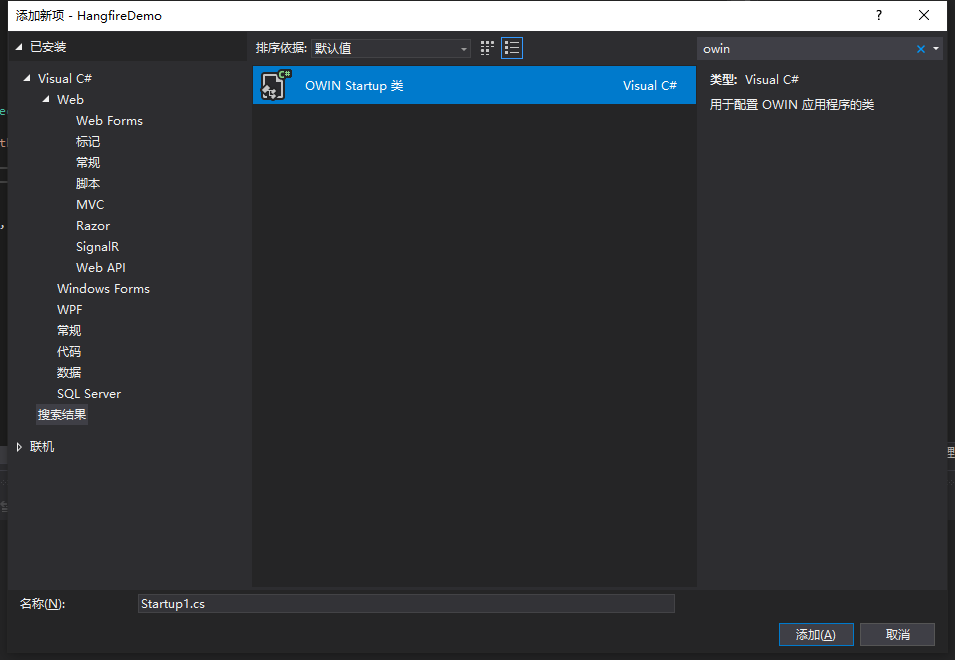
因为我使用的是MySQL数据库(使用SQL Server可以去看官网的例子),使用NuGet添加:
Install-Package Hangfire.MySqlStorage
可以去GitHub查看这个包的说明:Hangfire MySql Storage
将官网的实例代码复制到Startup类中,并修改了数据存储的配置如下:
public class Startup{ private IEnumerable<IDisposable> GetHangfireServers() { GlobalConfiguration.Configuration .SetDataCompatibilityLevel(CompatibilityLevel.Version_170) .UseSimpleAssemblyNameTypeSerializer() .UseRecommendedSerializerSettings() .UseStorage(new MySqlStorage("server=127.0.0.1;user id=root;password=111111;Database=hangfiretest;pooling=true;charset=utf8;Allow User Variables=True;", new MySqlStorageOptions { //CommandBatchMaxTimeout = TimeSpan.FromMinutes(5), //SlidingInvisibilityTimeout = TimeSpan.FromMinutes(5), //QueuePollInterval = TimeSpan.Zero, //UseRecommendedIsolationLevel = true, //DisableGlobalLocks = true })); yield return new BackgroundJobServer(); } public void Configuration(IAppBuilder app) { app.UseHangfireAspNet(GetHangfireServers); app.UseHangfireDashboard(); // Let's also create a sample background job BackgroundJob.Enqueue(() => Debug.WriteLine("Hello world from Hangfire!")); // ...other configuration logic }}说明:
- Github上面也提示我们连接字符串要设置允许用户变量,不然你就要收到一个异常了。
There must be Allow User Variables set to true in the connection string. For example:
server=127.0.0.1;uid=root;pwd=root;database={0};Allow User Variables=True

- MySQL的MySqlStorageOptions选项和SQLServer不同,这里也不清楚这些配置的作用,先全部注释掉了,以后再研究。
这时候就可以运行了 ,成功后可以看得到我们建的空数据库里面已经有自动生成的表了,并且在输出窗口中可以看到任务执行输出的:
Hello world from Hangfire!
在启动的页面地址后面加上 /hangfire,就可以看到Dashboard页面。
添加日志功能
在遇到任务失败的时候日志能帮助我们更好的查找问题。
Hangfire支持一下日志框架(并且可以自动识别项目中的引用,为我们记录日志):
- Serilog
- NLog
- Log4Net
- EntLib Logging
- Loupe
- Elmah
如果项目中引用了多个日志框架,日志可能会失败,你可以使用下面的代码来配置想使用的日志框架
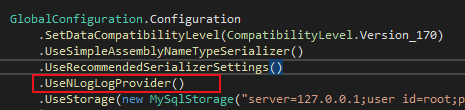
GlobalConfiguration.Configuration .UseSerilogLogProvider() .UseNLogLogProvider() .UseLog4NetLogProvider() .UseEntLibLogProvider() .UseLoupeLogProvider() .UseElmahLogProvider();
我用了NLog,这里为了让其他同事更清楚我配置了日志功能,所以尽快Hangfire可以自动识别,我还是把这一句加上了。
然后我无情的发现日志没有生成,忘记了NLog的配置文件,添加上就好了。
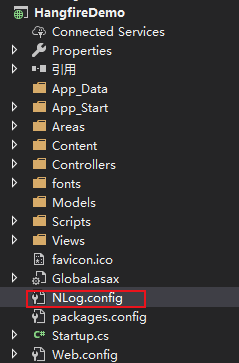
<??><nlog ="http://www.nlog-project.org/schemas/NLog.xsd" ="http://www.w3.org/2001/ xsi:schemaLocation="http://www.nlog-project.org/schemas/NLog.xsd NLog.xsd" autoReload="true" throwExceptions="true" internalLogLevel="Debug" internalLogFile="c:\temp\nlog-internal.log"> <!--throwExceptions 打印出Nlog的内部错误--> <!-- optional, add some variables https://github.com/nlog/NLog/wiki/Configuration-file#variables --> <variable name="myvar" value="myvalue"/> <!-- See https://github.com/nlog/nlog/wiki/Configuration-file for information on customizing logging rules and outputs. --> <targets> <!-- add your targets here See https://github.com/nlog/NLog/wiki/Targets for possible targets. See https://github.com/nlog/NLog/wiki/Layout-Renderers for the possible layout renderers. --> <!-- Write events to a file with the date in the filename. <target xsi:type="File" name="f" fileName="${basedir}/logs/${shortdate}.log" layout="${longdate} ${uppercase:${level}} ${message}" /> --> <!--文件--> <target name="fileLog" xsi:type="File" fileName="${basedir}/logs/${date:format=yyyyMM}/${shortdate}.log" layout="${longdate} ${logger} ${level:uppercase=true} ${message} ${exception:format=ToString}" /> </targets> <rules> <!-- add your logging rules here --> <!-- Write all events with minimal level of Debug (So Debug, Info, Warn, Error and Fatal, but not Trace) to "f" <logger name="*" minlevel="Debug" writeTo="f" /> --> <logger name="*" minlevel="Info" writeTo="fileLog" /> </rules></nlog>日志成功生成

Hangfire 入门 (使用MySQL存储)大咖云集 跨境电商实操分享 中国跨境电商大咖论坛第二季、 JOOM入驻基础及培训、 知识产权之专利篇、 亚马逊创建listing、 网传亚马逊编码方式天天秒杀、 韭菜割不停?中国卖家占亚马逊总卖家6成以上?、 Shopify携手ArcMEAD与全球大卖共话中国品牌出海新征途、 亚马逊新规持续发酵,卖家论坛反对直接禁言!、

没有评论:
发表评论